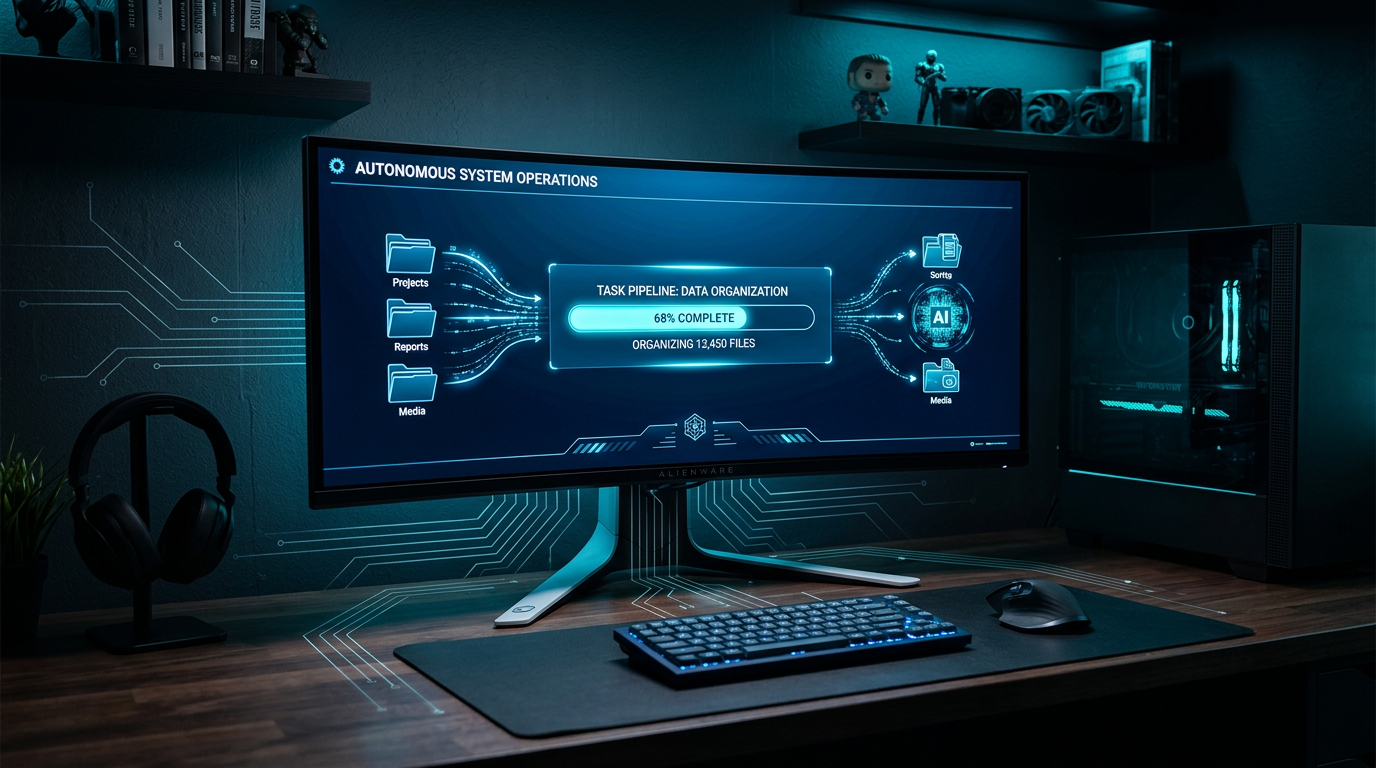
What Is a Desktop AI Agent? The Definitive Guide (2026)

Anmol Singh
• • 11 min read
Knowledge workers spend 60% of their time on "work about work" — emails, file sorting, report reformatting, and meeting follow-ups — rather than on the skilled tasks they were actually hired to do (Asana Anatomy of Work Index, 2025). Desktop AI agents exist to close that gap: they run directly on your computer, take on the repetitive file-and-document grind, and hand you back finished work while you focus on what only you can do.
This guide explains exactly what a desktop AI agent is, how it works under the hood, how it compares to the web AI assistants you may already use, and what to look for when choosing one.
Key Takeaways
- Knowledge workers lose 60% of their day to "work about work" — admin, file management, and repetitive tasks (Asana, 2025).
- A desktop AI agent runs locally on your Mac or Windows machine and completes tasks on your files, folders, and documents autonomously — no cloud upload required.
- Frequent AI tool users save an average of 9+ hours per week vs. non-users (McKinsey Global Institute, 2025).
- The global AI agent market is projected to grow from $7.6 billion in 2025 to $183 billion by 2033 (Allied Market Research, 2025).
- The defining feature of a desktop AI agent is local execution: your files never leave your machine.
What Is a Desktop AI Agent?
A desktop AI agent is software that runs on your local computer — Mac or Windows — and uses artificial intelligence to plan and complete multi-step tasks on your behalf, operating directly on the files, folders, and applications on your machine. Unlike a chatbot that answers questions, a desktop AI agent acts: it opens documents, reads their contents, executes a workflow, and delivers a finished output.
The key word is autonomous. You give it a task — "turn these invoices into an expense report" or "pull the action items from last week's meeting notes" — and it handles every step without you supervising each move. When it needs your input, it asks. Otherwise, it works.
Three things distinguish a desktop AI agent from other AI tools:
Local execution. The agent runs on your hardware, not a remote server. Your files are processed on your machine and never uploaded to a third-party cloud unless you explicitly choose a cloud-connected integration.
Multi-step planning. It doesn't just respond to one prompt. It breaks a goal into a sequence of steps, executes them in order, handles errors, and adapts if something unexpected happens mid-task.
File and app access. It can read, write, rename, move, and create files. It can interact with applications on your desktop. It operates in the same environment where your actual work lives.
According to a 2025 PwC survey, 79% of organizations have already begun adopting AI agents in some form (PwC AI Business Predictions, 2025). The fastest-growing segment is local and desktop-based agents, driven by privacy concerns and the practical need to work with files that exist on a user's machine rather than in cloud storage.
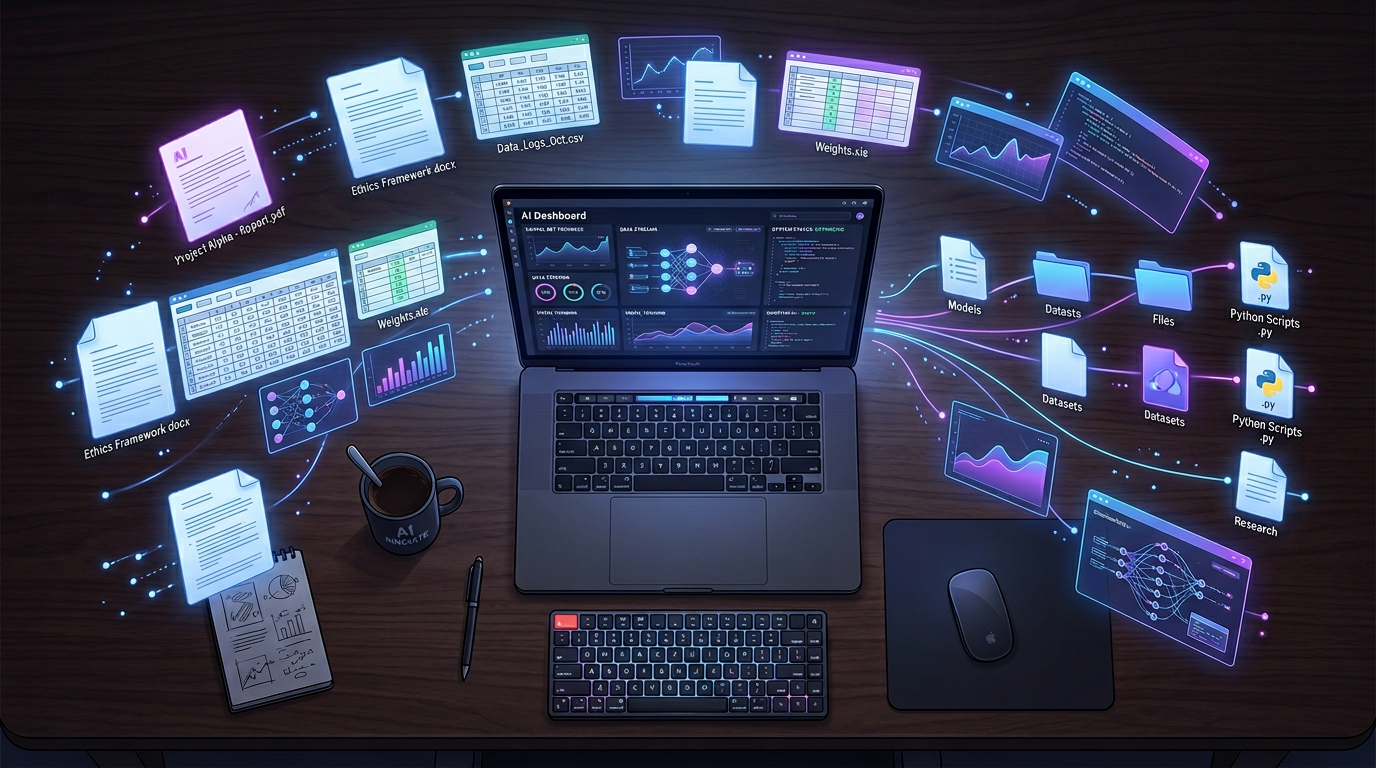
AI automation for non-technical users
How Does a Desktop AI Agent Actually Work?
Most desktop AI agents combine three components: a reasoning engine, a task execution layer, and a set of tools (or "skills") the agent can call on to complete specific jobs.
The reasoning engine is the AI model at the center — it reads your instruction, interprets the goal, plans a sequence of steps, and decides which tools to use at each stage. It's the "thinking" part of the system.
The task execution layer translates the model's plan into actions on your computer: opening a file, running a script, calling an API, or writing output to a folder. This layer is what makes an agent different from a chatbot — it doesn't just generate text, it does things.
Skills and integrations are the specific capabilities the agent can tap. A skill might be "read all PDFs in this folder and extract the total amounts," or "connect to my calendar and pull tomorrow's meetings." Better desktop AI agents let you activate pre-built skills for common tasks and connect to external services through standard protocols like MCP (Model Context Protocol).
Here's what that looks like in practice with a real task:
- You send a message: "Sort the invoices in my Downloads folder by vendor and build me a summary spreadsheet."
- The agent reads the instruction and plans: scan folder → identify invoice files → extract vendor names and amounts → create spreadsheet → save with a timestamped filename.
- It executes each step sequentially, pausing to ask if it encounters anything ambiguous.
- It hands you the finished spreadsheet — usually in minutes.
No manual steps. No copy-pasting. No reformatting.
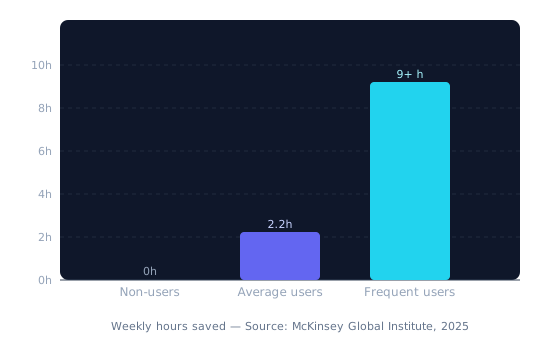
Weekly hours saved by AI tool usage frequency. Source: McKinsey Global Institute, 2025
Desktop AI Agent vs. Web AI Assistant: What's the Difference?
The AI tools most people have tried — ChatGPT, Claude, Gemini — are web AI assistants. They're powerful, but they operate in a fundamentally different mode from desktop AI agents. Understanding the difference helps you know which tool belongs in your workflow.
Web AI assistants work in a browser or app. You send a message, they respond. They can draft emails, answer questions, summarize content you paste in, and generate text. But they don't have access to your file system, they can't complete multi-step tasks autonomously, and every interaction requires you to be present and directing.
A desktop AI agent works where your files live. The comparison that makes this concrete: a web AI assistant is like calling a very smart consultant on the phone and describing your problem — useful, but you're doing all the legwork. A desktop AI agent is more like having a capable team member sitting at your desk: they can open the actual files, do the work, and put the finished deliverable in your folder.
| Web AI Assistant | Desktop AI Agent |
|---|---|
| Where it runs | Cloud / browser |
| File access | Only what you paste in |
| Task style | Single-turn Q&A |
| Privacy | Files sent to cloud |
| Control method | Browser / app |
| Best for | Drafting, answering, summarizing |
Neither is better universally — they're different tools for different jobs. Many knowledge workers use both: a web assistant for quick answers and drafting, a desktop agent for the repetitive file and document work that would otherwise eat two hours of the afternoon.
Teams that adopt desktop AI agents alongside web assistants rather than treating them as interchangeable report the fastest productivity gains, because each tool handles the work it was built for
What Can a Desktop AI Agent Actually Do?
The clearest way to understand a desktop AI agent's capabilities is through concrete use cases rather than feature lists. Here are the four categories where desktop AI agents deliver the most consistent value for knowledge workers.
File Organization and Management
Most people's file systems are an archaeology site — layers of folders with names like "Final_v3_REAL" sitting next to "New Folder (2)." A desktop AI agent can scan a messy Downloads folder, read file contents, and reorganize everything by type, date, project, or whatever logic you specify. It renames files consistently, removes duplicates, and hands you back a structure that makes sense.
What used to take an afternoon or got indefinitely postponed — takes minutes.
Document and Spreadsheet Building
This is where desktop AI agents save the most time for most people. Give the agent a folder of receipts, invoices, or CSVs and it can extract the relevant data, structure it into a spreadsheet, apply totals and formulas, and save the finished file — ready to send. No copy-pasting. No manual data entry.
The same applies to reports: point the agent at your data and your template, and it fills the template, formats the content, and delivers the document. Dume Cowork, for example, handles this end-to-end — it reads the source material, follows the template structure, and hands you a finished document you can send directly.
Research and Note Analysis
Meeting notes, strategy docs, email threads, project briefs — knowledge workers generate enormous amounts of text that rarely gets properly processed. A desktop AI agent can read a folder of notes and pull out the decisions made, the action items assigned, and the deadlines mentioned. It can cross-reference multiple documents to surface connections you might have missed.
This turns raw documentation into actionable intelligence rather than an archive you'll never revisit.
Workflow Automation via Skills
The best desktop AI agents ship with a library of pre-built skills — ready-to-run workflows for common tasks like document prep, research summarization, and data formatting. Instead of building a custom automation from scratch, you activate a skill, point it at your files, and it runs. New capabilities get added to the library over time, so the agent becomes more capable without requiring any configuration on your part.
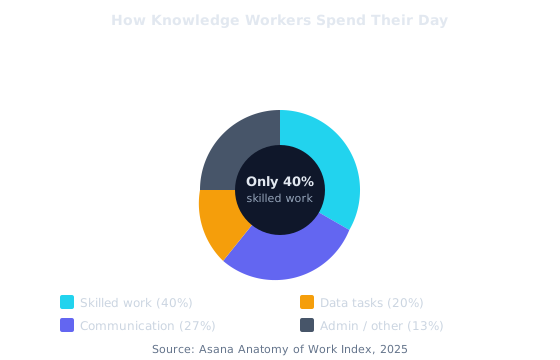
How knowledge workers actually spend their time. Source: Asana Anatomy of Work Index, 2025
Why Local-First Privacy Matters for a Desktop AI Agent
Privacy is the most overlooked differentiator in the AI agent category. When you use a web-based AI tool to work with your files, those files travel to a cloud server — someone else's computer — to be processed. For personal notes or public documents, that's often fine. For client contracts, financial records, HR documents, or sensitive business data, it's a different calculation entirely.
A local-first desktop AI agent processes your files on your own machine. The data doesn't leave your hard drive unless you explicitly integrate a cloud service. This matters for three reasons.
Compliance. Many industries operate under data regulations — GDPR in Europe, HIPAA in healthcare, CCPA in California — that restrict where sensitive data can be processed. Local execution removes an entire category of compliance risk.
Client trust. If you work with client files, you're often bound by confidentiality expectations that predate any privacy policy. Uploading those files to a third-party server for processing — even a reputable AI vendor — may violate agreements or erode the trust you've built.
Control. Local execution means you can audit what the agent does. You see the files it reads and the files it creates. Nothing happens invisibly in a remote environment.
A local-first desktop AI agent — like Dume Cowork — keeps your files on your machine throughout the entire task. Your documents are never uploaded to a cloud server, and every action the agent takes can be reviewed, approved, or cancelled before it runs. For knowledge workers handling sensitive material, this isn't a nice-to-have it's the baseline.
According to a 2025 IBM Institute for Business Value report, data privacy concerns are now the top barrier to AI agent adoption in regulated industries, cited by 67% of decision-makers who haven't yet deployed agents (IBM IBV, 2025). Local-first architecture directly removes that barrier.

How to Choose a Desktop AI Agent: 5 Things That Actually Matter
By 2026, 40% of enterprise software applications will include embedded AI agent capabilities, according to Gartner. That means the market is getting crowded fast — and the feature lists are starting to look identical. Here's what to evaluate beyond the marketing.
1. Does It Run Locally?
This is the foundational question. Some tools marketed as "desktop agents" are thin wrappers around cloud APIs they appear to run on your computer but send your files elsewhere for processing. Ask explicitly: does processing happen on my machine, or on a remote server?
2. What File Types Does It Actually Handle?
A desktop AI agent that can only read PDFs will leave most of your workflow untouched. Look for coverage across the formats your work actually lives in: Word documents, Excel and CSV files, PowerPoint, plain text, email exports, and image files at minimum.
3. How Does It Handle Ambiguity?
Any real workflow will hit moments of uncertainty — a file with an unexpected format, a folder with inconsistent naming, an instruction that could be interpreted two ways. A good desktop AI agent pauses and asks rather than making a guess that corrupts your data. Test this early.
4. Can You Extend It?
Pre-built skills handle common cases well, but your work has edge cases. Look for an agent that supports custom skills, third-party integrations (MCP support is the emerging standard), and connection to the tools already in your stack — your calendar, your project management system, your cloud storage.
5. Is There a Control Layer?
You should be able to review what the agent plans to do before it does it — especially for actions that move or overwrite files. The best desktop AI agents require user approval before irreversible actions and give you a clear log of everything they've done.
The agents that get used daily are the ones that feel trustworthy, not just capable. User approval flows and transparent action logs aren't limitations they're the feature that makes people comfortable handing over real work.
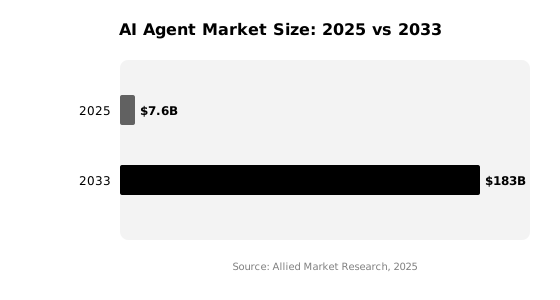
AI agent market size: $7.6B in 2025, projected $183B by 2033. Source: Allied Market Research, 2025
Getting Started With a Desktop AI Agent: What to Expect
Most people expect getting started with a desktop AI agent to feel like setting up enterprise software — days of configuration, IT involvement, a learning curve that takes weeks to flatten out. The reality with modern desktop AI agents is much simpler.
With Dume Cowork, for example, you're operational in under five minutes. Download the app, open it, and describe your first task. There's no API key setup, no workflow builder to configure, no schema to define. You point it at a folder, tell it what you need, and watch it work.
A practical first task to try: point the agent at a folder of documents and ask it to extract the key decisions or action items from each one. It's a real job that usually takes 30-45 minutes manually, it has clear success criteria, and it immediately demonstrates what the agent can and can't handle for your specific files.
From there, the pattern is straightforward: identify the tasks in your week that are (a) repetitive, (b) file-based, and (c) time-consuming, then hand them to the agent one at a time. Most people land on a small set of five to ten recurring tasks that together save them 2+ hours a day.
According to Dume.ai's own user data, people using the platform save an average of 2.6 hours every day — primarily by offloading file work, report preparation, and note processing to the agent, freeing those hours for client work, strategy, and deep focus.
Try Dume Cowork — The Desktop AI Agent Built for Knowledge Workers
Dume Cowork runs on your Mac or Windows machine, handles file work and reports end-to-end, and can be controlled from WhatsApp. Your files stay on your machine. You stay in control. Up and running in under five minutes.
Start for Free — No Card Required →
No credit card required. Works on Mac and Windows.
Frequently Asked Questions
Conclusion: The Case for Adding a Desktop AI Agent to Your Workflow
The math on knowledge worker time is stark: 60% of your workday is spent on coordination, administration, and file work rather than the skilled tasks your judgment is actually needed for (Asana, 2025). AI agents that work in the browser help with some of that. But the file-level, document-heavy grind — the organizing, building, and processing that happens on your actual computer — is where a desktop AI agent makes its strongest case.
The category is maturing fast. The AI agent market is on track to grow 24x by 2033. The tools available today are already practical enough to hand real work to. The question isn't whether desktop AI agents will become standard in knowledge worker workflows — it's whether you start now and bank those hours, or wait until everyone else already has.
Meet Dume Cowork the AI agent that works your computer while you don't and Dume for Chrome, your AI assistant right inside every browser tab. Both free to try.