How to Create AI Agents in 5 Steps: A Complete 2026 Guide

Team Dume.ai
Jan 29, 2026 • 16 min read
AI agents are intelligent software programs that can execute tasks, make decisions, and interact with tools and humans on your behalf. In this 2026 guide, you will learn how to create AI agents in 5 simple steps so you can automate workflows without code and dramatically reduce manual work.
This guide is written for solopreneurs, startup teams, and operators in SaaS and AI‑driven businesses who want practical, real‑world instructions not abstract theory.
What Are AI Agents?
In 2026, “AI agent” is a practical term, not just a research concept.
An AI agent is a software system that:
- Perceives input (from text, tools, or events)
- Decides what to do (using rules + AI models)
- Acts on your behalf (sending messages, updating tools, scheduling, summarizing)
You can think of an AI agent as a specialized digital coworker with a clear job: “handle inbound customer emails,” “turn meetings into tasks,” or “keep my project tools in sync.”
How AI agents differ from chatbots or simple AI scripts
Traditional chatbots and simple LLM prompts are mostly reactive. They answer questions in a chat window when a user types something.
AI agents go further in four key ways:
- Autonomous behavior
They can run without you starting a chat based on triggers like “new email received” or “meeting ended.” - Tool interaction
They can call APIs and tools such as Gmail, Slack, Notion, Jira, or your calendar, not just generate text. - State and memory
They can store and recall context over time: previous conversations, user preferences, project history. - Multi-step workflows
They can coordinate sequences of actions (listen → reason → act → log) rather than a single response.
How AI agents interact with tools and apps
Modern AI agents sit at the center of your stack. They connect to:
- Email (Gmail, Outlook) to read and respond
- Calendars (Google Calendar, Outlook Calendar) to schedule and update events
- Collaboration tools (Slack, Teams, Discord) to post updates and answer questions
- Knowledge bases (Notion, Confluence, Google Drive) to search and summarize information
- Task and issue trackers (Asana, Trello, Jira, Linear) to create and update tasks
They typically use:
- Webhooks or event listeners to know when something has changed
- APIs and integrations to read/write data
- LLM models to interpret, reason, and generate content
Why memory and context matter
Without memory, an AI agent is just “smart autocomplete.” With memory, it becomes a useful assistant.
Memory lets an agent:
- Remember user preferences (“always reply politely and suggest a meeting next week”)
- Track conversation history across threads and tools
- Understand project context (what’s been done, what’s pending)
- Avoid repeating questions and actions
Context can be:
- Short-term: the current email thread, the last meeting transcript
- Long-term: user profile, customer history, project documents
Designing what your agent should remember and for how long is a critical part of effective agent creation.
Key points
- AI agents are autonomous software assistants that can perceive, decide, and act.
- They are more powerful than chatbots because they connect to tools and run workflows.
- They rely on triggers, integrations, and memory to operate in real time.
- In 2026, non‑developers can create AI agents using no‑code or low‑code platforms.
- Memory and context make agents more accurate, personal, and useful.
Why AI Agents Matter in 2026
In 2026, work is increasingly fragmented across tools, channels, and notifications. AI agents provide a structured way to reclaim focus, especially for solopreneurs and lean teams.
1. Automating repetitive tasks
AI agents are ideal for recurring, rule‑based knowledge work such as:
- Categorizing and responding to inbound emails
- Turning meeting conversations into tasks and follow‑up messages
- Updating project statuses across tools
- Preparing daily summaries or reports
Instead of manually processing information, you design the rules once and let the agent run in the background.
2. Boosting productivity for solopreneurs and teams
For a solo founder, small team, or agency, time is the main constraint. AI agents:
- Handle low‑value, high‑volume operations
- Keep CRM, project tools, and docs in sync
- Provide instant summaries so humans can make faster decisions
The result: more time spent on strategy, customer conversations, and product work.
3. Reducing cognitive load
Constant context switching drains energy. Agents help by:
- Providing concise digests (e.g., “Here’s what happened today in your inbox and projects”)
- Pre‑sorting and tagging work before it hits your attention
- Surfacing only what requires human judgment
This reduces mental overhead and decision fatigue.
4. Unifying workflows across tools
Instead of stitching together dozens of zaps and scripts, AI agents can act as a single intelligence layer across:
- Email ↔ Calendar ↔ Tasks
- CRM ↔ Support desk ↔ Slack
- Product analytics ↔ Roadmap tools
Because agents understand natural language and context, they can make smarter decisions than rigid if‑else automations.
Why AI agents matter in 2026:
AI agents are important because they automate repetitive digital work, connect your tools, and remember context across emails, meetings, and tasks. This reduces manual effort, improves response times, and frees solopreneurs and teams to focus on high‑value work instead of admin.
How to Create AI Agents in 5 Steps
This is the practical, step‑by‑step section that answers: How do you create an AI agent step by step?
The five core steps are:
- Choose your use case
- Select a framework or platform
- Configure inputs and triggers
- Define actions and outputs
- Test and iterate
Each step builds on the previous one, and you can usually do all five without writing traditional code if you use a modern platform like Dume.ai.
Step 1 — Choose Your Use Case
The biggest mistake in building AI agents is starting with the tech instead of the problem. Start with a narrow, clearly defined job.
Define a specific objective
Ask:
- What is the exact task I want the agent to do?
- How will I know if it did a good job?
- How often will this happen (daily, hourly, per event)?
Good example use cases:
- “Summarize every customer support call and create follow‑up tasks in Notion.”
- “Draft and send polite acknowledgment emails to new inbound leads.”
- “Generate and assign post‑meeting tasks in Jira after every sprint review.”
- “Post a daily project status summary in Slack at 5 PM.”
Weak example use cases:
- “Handle everything related to sales.”
- “Automate my job.”
- “Be a general AI assistant.”
Start with a narrow slice that has:
- Clear inputs (what the agent receives)
- Clear outputs (what the agent should produce or change)
- Clear success criteria (how you’ll judge performance)
Best practices for defining your first agent
Borrowing from the way leading automation and agent tools define workflows, follow these principles:
- Single responsibility: One agent = one main job. If you catch yourself adding lots of “and also,” split it into multiple agents.
- Observable outcomes: Make sure your agent produces something you can quickly review (e.g., email draft, Slack message, task).
- Low‑risk domain first: Start with internal summaries or draft content rather than sending final messages to customers.
- Measurable: Decide on 1–3 simple metrics, such as:
- % of agent outputs accepted without editing
- Time saved per week
- Response time improvement
Once you have a clear use case, you’re ready to choose where your agent will live.
Step 2 — Select a Framework or Platform
You have two broad paths:
- Build from scratch using frameworks and APIs
- Use a no‑code/low‑code platform designed for AI agents
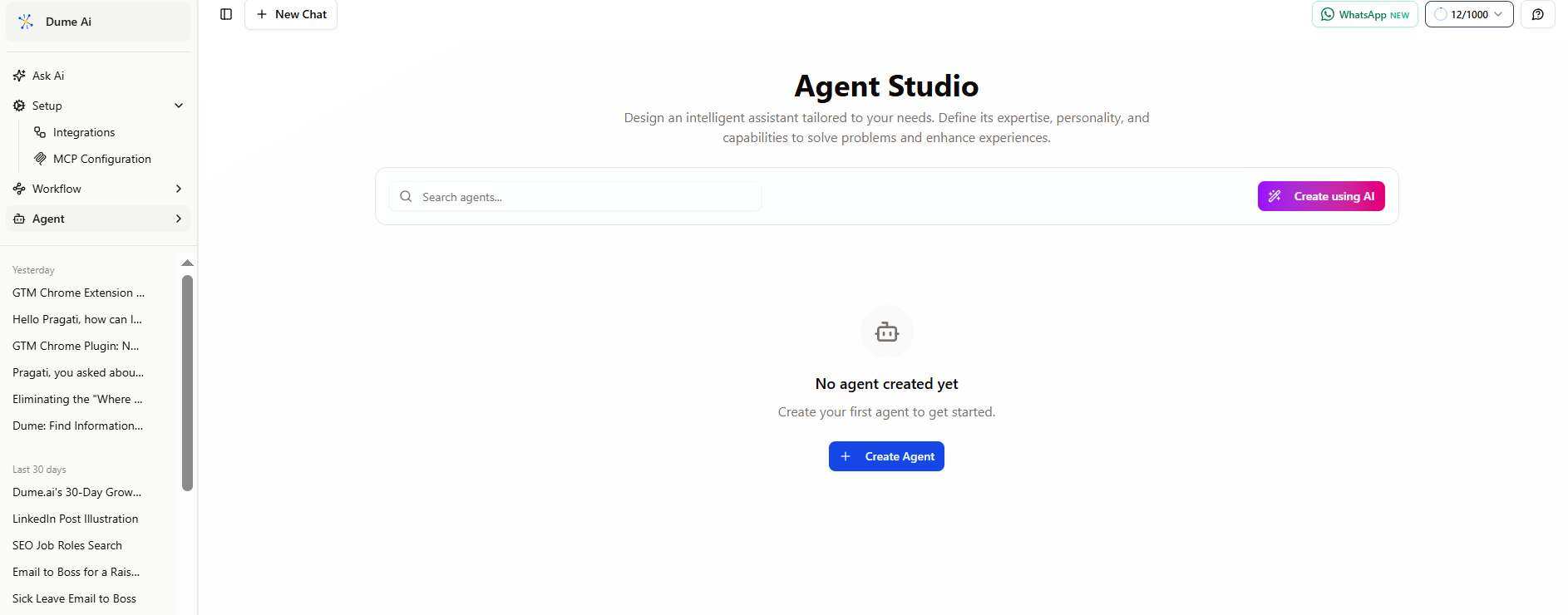
If you want to try without writing code, you can start inside Dume.ai’s Agent Studio, a visual builder for creating specialized AI agents with skills, memory, and integrations. You can follow their getting‑started guide here:
Dume.ai Agent Studio – Getting Started
For most solopreneurs and teams, a platform is faster, safer, and easier to maintain.
Option A: Frameworks (for developers)
If you have engineering resources, you can build on:
- Agentic libraries and SDKs (e.g., LangChain‑style tools, open‑source orchestration frameworks)
- Cloud AI providers’ agent runtimes
- Custom back‑ends wired to your own integrations
Pros:
- Maximum flexibility
- Full control over data, logic, and infrastructure
- Deeper customization for complex use cases
Cons:
- Requires coding and DevOps
- Longer time to first value
- Ongoing maintenance for API changes and reliability
Option B: Platforms (for non‑developers)
No‑code and low‑code platforms let you:
- Click to connect tools like Gmail, Slack, Notion, Jira
- Configure triggers, prompts, and actions via UI
- Add memory and logging without writing infrastructure code
- Deploy agents quickly and iterate in hours, not weeks
What to look for in a good AI agent platform:
- Integrations: Direct connections to the tools you actually use
- Memory capabilities: Ability to store and reference past interactions and documents
- Conditional logic: “If this, then that” style flows and branching
- Observability: Logs, run histories, and ways to debug failures
- Security and permissions: Fine‑grained controls for who can run or edit agents
Where Dume.ai fits
Dume.ai is designed as a practical agent builder for workflow and task automation. Instead of stitching separate tools together, you define:
- What should trigger the agent
- What context it can access (email, docs, tasks)
- What actions it should take (create tasks, send messages, update records)
For most small teams, this provides the fastest route to a working agent without needing to design an entire architecture.
Step 3 — Configure Inputs and Triggers
Once you’ve chosen your platform or tech stack, the next step is to define how your AI agent listens to the world.
An agent needs three things here:
- Inputs
- Triggers
- Conditions
Inputs: What your agent can see
Inputs are the raw materials the agent works with, such as:
- An incoming email body and subject line
- A calendar event and its transcript
- A Slack message in a specific channel
- A meeting recording or call log
- A document or knowledge base reference
Typical input configuration steps:
- Connect data sources (e.g., Gmail, Google Calendar, Slack, Notion)
- Specify what data to pull (e.g., message text, attachments, participants)
- Decide on any pre‑processing (e.g., only English messages, only emails with attachments)
Triggers: When your agent should wake up
Triggers define the moment the agent should run. Common triggers include:
- Event-based:
- New email received from a customer
- Meeting ended on your calendar
- New task created in a specific project
- New support ticket opened
- Time-based:
- Every day at 6 PM (daily summary)
- Every Monday at 9 AM (weekly report)
- Manual:
- Slash command in Slack (e.g.,
/agent summarize) - Button click in a dashboard
- On‑demand inside a tool UI
- Slash command in Slack (e.g.,
In a platform like Dume.ai, you typically choose:
- The integration (e.g., Gmail)
- The event type (e.g., “New email received”)
- Any filters (e.g., “from @customer.com domain only”)
Conditions: Narrowing down when the agent should act
Conditions are rules that prevent your agent from running unnecessarily. Examples:
- Only run if the email subject contains “support,” “bug,” or “issue.”
- Only run if the meeting duration is > 10 minutes.
- Only run for messages in a specific Slack channel.
- Skip if the sender is internal (your own domain).
This avoids noise and keeps your agent focused on meaningful events.
Real‑world trigger scenarios
- Customer email triage agent
- Input: New emails to
support@yourcompany.com - Trigger: “New email received” in that inbox
- Conditions:
- Only external senders
- Ignore auto‑replies and system messages
- Result: Agent classifies, summarizes, and drafts a reply or creates a ticket.
- Input: New emails to
- Post‑meeting task generator
- Input: Calendar event + transcript/notes
- Trigger: Meeting ends
- Conditions:
- Only meetings with label “Customer Call” or “Sprint Review”
- Result: Agent generates a summary and tasks in your project tool.
- Slack stand‑up summarizer
- Input: Messages in
#daily-standupchannel - Trigger: Every weekday at 4 PM
- Conditions:
- Only today’s messages
- Result: Agent posts a concise summary of blockers, progress, and priorities.
- Input: Messages in
Thoughtful trigger design ensures your agent is helpful rather than noisy.
Step 4 — Define Actions & Outputs
With triggers in place, the next step is specifying what the AI agent should do once it’s activated.
Think of this as “if this happens, the agent will do that.”
Actions: What the agent actually executes
Common types of actions include:
- Content creation and transformation
- Drafting email replies
- Generating meeting summaries
- Rewriting content in a different tone or format
- Task and project management
- Creating tasks in Notion, Jira, Asana, or Trello
- Updating task status or assignees
- Adding comments with key notes
- Communication and notifications
- Posting messages to Slack or Teams
- Sending DMs or group updates
- Tagging relevant stakeholders
- Calendar and scheduling
- Proposing and creating follow‑up meetings
- Adding reminders and notes
- Data operations
- Logging activity in a spreadsheet or database
- Updating CRM records
- Tagging tickets and adding labels
Most modern platforms (including Dume.ai) let you add multiple actions in sequence to create workflows, such as:
- Summarize an email
- Decide if it’s urgent
- If urgent, post to Slack and create a task
Outputs: What the user or system receives
Outputs are the visible or stored results of your agent’s actions, for example:
- An email draft (that you can review and send)
- A new task with title, description, priority, and assignee
- A structured summary posted to a Slack channel
- A log entry in your database with key fields extracted
When defining outputs, consider:
- Format: Free text vs. structured JSON vs. bullet points
- Tone: Formal, friendly, concise, highly detailed
- Audience: Internal team vs. external customers
- Actionability: Does the output clearly indicate what should happen next?
Mapping “if‑this‑then‑that” logic
Even though AI agents are smart, explicit logic still matters. A typical flow might look like:
- If the incoming email is a “feature request,”
→ create a task in the product backlog and label it “feature-request.” - If the email expresses frustration or uses negative sentiment,
→ tag as “high priority,” notify the support lead in Slack, and draft a personalized response. - If the meeting is an internal stand‑up,
→ summarize blockers and action items in bullets and post them in#project-team.
In a platform environment, you usually define conditions and branches visually, then instruct the AI model with prompts such as:
“Classify this email into one of: bug, feature request, billing, general question. Output only the label.”
Step 5 — Test & Iterate
Even the best‑designed AI agents are imperfect at first. Testing and iteration turn a rough prototype into a reliable assistant.
Why testing is critical
- AI models can misinterpret edge cases
- Integrations occasionally fail or rate‑limit
- Seemingly minor prompt changes can shift behavior
- Real‑world data is messy and inconsistent
Testing lets you catch:
- Incorrect classifications and unwanted actions
- Confusing or off‑brand language
- Performance issues and timeouts
- Security or permission mistakes
How to test an AI agent effectively
- Start in “suggestion mode” instead of full automation
For example, let the agent draft replies but require human review before sending. - Use historical data
Run the agent on past emails, tickets, or meeting notes so you can compare its outputs against what actually happened. - Check agent logs and run histories
Make sure your platform lets you see: - Input data
- Model decisions or classifications
- Actions taken
- Errors and exceptions
- Collect feedback from users
For team‑facing agents: - Ask: “Was this output accurate and helpful?”
- Track edits and overrides.
How to refine responses
When you see undesired behavior, iterate on:
- Prompts and instructions
- Clarify tone: “Always be concise and polite.”
- Clarify constraints: “Do not promise deadlines; instead say ‘we’ll review this.’”
- Clarify format: “Output a JSON object with fields: title, summary, priority, assignee.”
- Conditions and filters
- Tighten rules to exclude edge cases
- Add thresholds (e.g., only auto‑send if confidence score ≥ X)
- Memory usage
- Decide what context to load: last 5 emails in the thread, most relevant docs, user profile
- Trim unnecessary context to reduce confusion
Measuring accuracy and usefulness
Track metrics such as:
- % of outputs accepted without changes
- Number of manual overrides
- Time saved per week (estimated)
- Reduction in response times to customers
- Reduction in missed follow‑ups or tasks
Document your learnings in a simple log:
- What changed (prompt, condition, trigger)
- Why you changed it
- Before/after examples
Over a few iterations, your AI agent becomes more predictable, aligned with your workflows, and trusted by your team.
Common Mistakes When Building AI Agents
Avoiding common pitfalls will save you hours of debugging and frustration.
1. Overcomplicating triggers and scope
Problem:
- Trying to make one agent handle multiple unrelated tasks
- Creating overly broad triggers like “run on every incoming email”
Result:
- Noisy, unpredictable behavior
- Hard to debug and tune
Better:
- Start with a very specific, narrow use case
- Use precise triggers and filters
- Split complex behavior into multiple smaller agents
2. Ignoring edge cases
Problem:
- Not thinking about what happens with empty inputs, long threads, or unusual formats
- Assuming all emails or meetings follow a clean pattern
Result:
- Agent breaks or produces nonsensical outputs
- Loss of trust from users
Better:
- Define explicit behaviors for:
- Empty or extremely short inputs
- Attachments instead of text
- Non‑supported languages
- Add fallbacks like:
- “If you cannot understand, ask a human to review.”
3. Not setting limits or safety checks
Problem:
- Letting agents send emails directly to customers from day one
- Allowing agents to modify or delete critical data without review
Result:
- Risky messages
- Data loss or unwanted changes
Better:
- Start with drafts, not final actions
- Limit the agent’s permissions (e.g., can create tasks but not delete)
- Require human approval for high‑impact operations
4. Not measuring performance
Problem:
- Shipping an agent and assuming it “just works”
- No metrics, no logs, no feedback loop
Result:
- Invisible failures
- Missed opportunities for improvement
Better:
- Track:
- Usage (how often it runs)
- Success rate (how often output is accepted)
- Time saved (even rough estimates)
- Review logs weekly
- Iterate prompts and conditions based on data
Real-World Examples of AI Agents
Here are practical patterns you can copy and adapt.
1. Automatic meeting minutes + task generation
Use case:
After every customer or internal project meeting, the agent:
- Ingests the calendar event and transcript/notes.
- Generates:
- A concise summary (topics, decisions, next steps)
- A list of action items with owners and due dates.
- Creates tasks in Notion, Jira, or your PM tool.
- Posts the summary and task list to a Slack channel.
Benefits:
- No more manual note‑taking or forgotten follow‑ups.
- Everyone sees the same, structured summary.
2. Auto‑responding to customer emails
Use case:
For common inbound emails (e.g., basic pricing questions, simple support queries), the agent:
- Reads the email content and any attached data.
- Classifies the intent (billing, feature question, bug report).
- Retrieves relevant knowledge base content.
- Drafts a clear, helpful reply in your brand voice.
- Either:
- Sends automatically for low‑risk cases, or
- Prepares a draft for a human to approve.
Benefits:
- Faster response times
- Less repetitive typing for your support team
3. Calendar scheduling + follow‑ups
Use case:
For sales or onboarding calls, the agent:
- Detects a new meeting scheduled with a prospect.
- Before the meeting:
- Pulls CRM data and previous interactions.
- Sends a personalized reminder and agenda.
- After the meeting:
- Summarizes the call.
- Creates follow‑up tasks, including deadlines.
- Sends a recap email to the prospect with next steps.
Benefits:
- Consistent meeting follow‑through
- Smooth prospect experience
4. Project updates across tools
Use case:
In a cross‑functional team that uses multiple tools, the agent:
- Monitors task changes in Jira, Trello, or Asana.
- At the end of the day:
- Aggregates changes (completed, blocked, new).
- Groups them by project or feature.
- Posts a digest to Slack and updates a status doc in Notion.
Benefits:
- Less manual status reporting
- Everyone stays aligned without more meetings
Tools and Platforms for Creating AI Agents
There are many tools for AI automation agents. The right choice depends on your use case, technical skills, and stack.
Below is a conceptual comparison to help you think about positioning, not an exhaustive feature list.
Dume.ai — Workflow & Task Agents
Best for:
Solopreneurs and teams who want to automate workflows across email, tasks, docs, and communication tools without code.
Key capabilities:
- Intuitive agent builder focused on workflows and tasks
- Integrations with tools like Gmail, Slack, Notion, Jira, and similar work apps
- Memory features so agents can remember context and prior actions
- Visual configuration of triggers, conditions, and actions
- Logging and observability to see what each agent did and why
This makes Dume.ai well‑suited for:
- Meeting summary + task agents
- Email triage and response drafting agents
- Cross‑tool project synchronization agents
Other agent creation and automation tools (high-level)
To understand the landscape, it helps to mention a few categories of competitors:
- Agent‑focused productivity tools — Tools that help individuals or teams build personal and work agents embedded in their daily tools (e.g., note‑taking integrations, browser helpers, email assistants).
- Developer‑oriented agent frameworks — Toolkits for engineers to build deeply customized agents into their products.
- AI assistant platforms — Systems that expose agents as “assistants” or “copilots” that can be configured for specific tasks.
Different tools emphasize different strengths:
- Some prioritize research and web browsing agents.
- Some specialize in personal productivity and recall (e.g., capturing everything on your device and surfacing it later).
- Others focus on agents that live inside a messaging interface.Dume.ai vs other AI agent tools (2026 comparison)Dume.ai vs other AI agent tools (2026 comparison)
Dume.ai vs other AI agent tools (2026 comparison)
| Tool | Best Use Case | Integrations | Memory | Ease of Setup |
|---|---|---|---|---|
| Dume.ai | Workflow & task agents | Gmail, Slack, Notion, Jira, etc. | ✅ Yes | ⭐⭐⭐⭐⭐ |
| LangChain | Custom developer agents | APIs, custom tools (developer focus) | ✅ Yes | ⭐⭐ |
| CrewAI | Multi‑agent orchestration | Limited native, API‑heavy | ✅ Yes | ⭐⭐⭐ |
| Zapier | Simple automation agents | 7000+ apps | ❌ No | ⭐⭐⭐⭐ |
Use this kind of comparison to evaluate any platform, even beyond these examples:
- Does it connect to the tools you rely on daily?
- Does it support memory for better context?
- Is setup fast enough that you can test an idea in hours?
For most business‑oriented workflows, a platform like Dume.ai that focuses on integrations, memory, and workflow orchestration will provide the most immediate value.
Key Takeaways
- AI agents are intelligent software assistants that can automate workflows across your tools using triggers, logic, and memory.
- In 2026, creating AI agents is accessible to non‑developers thanks to no‑code and low‑code platforms.
- The 5 key steps are:
- Choose a focused use case
- Select a framework or platform
- Configure inputs and triggers
- Define actions and outputs
- Test and iterate with metrics
- AI agents are especially powerful for solopreneurs and small teams who need to save time on admin and coordination.
- Common pitfalls include overcomplicated scope, ignoring edge cases, skipping safety checks, and not measuring performance.
- Real‑world examples include meeting summary agents, email triage agents, scheduling and follow‑up agents, and project status agents.
- Dume.ai provides an intuitive way to create workflow and task agents with strong integrations and memory, without requiring code.
How to Create Agents with Agent Studio
Conclusion
Creating AI agents is now practical and accessible for solopreneurs, startups, and teams who want smarter workflows without hiring developers or building complex infrastructure. By focusing on a clear use case, selecting the right platform, carefully configuring triggers and actions, and committing to a simple test‑and‑iterate loop, you can turn repetitive digital work into reliable, automated processes.
The five‑step approach in this 2026 guide choose your use case, select a framework or platform, configure inputs and triggers, define actions and outputs, and test and iterate gives you a repeatable blueprint for building AI automation agents that actually ship and deliver value.
With Dume.ai’s intuitive agent builder and wide integrations, you can design agents that handle meeting summaries, email workflows, task generation, and cross‑tool updates in a fraction of the time it would take to code them from scratch. This lets you simplify complex workflows faster and with less effort, so you can focus on strategy, customers, and the work that truly matters.
FAQs
Explore the key differences between AI agents and chatbots. Learn when to use each and how dume.ai helps you build next-gen intelligent assistants.