How to Ask for a Raise via Email Professionally (Email Templates)

Team Dume.ai
• • 25 min read
To ask for a raise via email professionally, you should clearly state your request, reference your contributions and measurable results, maintain a respectful tone, and invite a conversation rather than demand an outcome. A well-written raise request email is concise, confident, and supported by evidence of your value to the organization.
Email allows you to carefully organize your case, present a formal record, and give your manager time to prepare before discussing compensation. This structure often leads to more thoughtful conversations than informal in-person requests.
How Do You Ask for a Raise via Email Professionally?
Asking for a raise via email works because it removes the pressure of an unscheduled conversation and lets you present a logical, evidence-backed case instead of an improvised pitch. Your manager can also forward your email to HR or their leadership without losing clarity, which often happens when they try to summarize a hallway conversation.
The key is structuring your email so it answers three things your manager needs to evaluate: (1) what you're asking for, (2) why you deserve it, and (3) what happens next. This isn't about being pushy. It's about making their decision easier.
Email is appropriate when you work remotely, when your manager is typically busy, or when you want to create a written reference for future conversations. It's less appropriate if you've never discussed compensation with your manager before. In that case, use email to request a meeting, not to make your full case.
What managers expect in a professional raise request is specificity. Vague requests like "I think I'm underpaid" don't give them enough information to advocate for you with finance or senior leadership. Managers need to see: your recent wins, how your responsibilities have grown, and evidence that your ask aligns with market rates. When you provide this, they can present your case to decision-makers without filling in gaps themselves.
The emotional tone matters more than most people realize. A calm, respectful email signals that you've thought this through rationally, not that you're frustrated or desperate. Managers are more likely to champion someone who comes across as confident and collaborative than someone who sounds resentful or demanding.
When Is the Right Time to Ask for a Raise via Email?
Timing separates successful raise requests from those that get rejected outright. Even if your performance is strong, asking at the wrong moment makes it easy for your manager to say no.
After Successful Project Completion
The weeks immediately following a major project success are among the best moments to ask. You have a concrete, recent example of your impact that you can reference directly. Your manager is likely aware of the project's importance and your role in it. This isn't luck, it's strategic timing. You're connecting your raise request to a tangible win, not asking your manager to remember everything you've done over 12 months.
During or Shortly After Annual Performance Reviews
Performance reviews are the established moment in most organizations when compensation discussions happen. Your manager is already thinking about your contributions, feedback is fresh, and if the review went well, you have data supporting your request. Many companies expect salary discussions at this time, so you're not catching your manager off guard.
If your review is positive, send your raise request email within one to two weeks. Any longer and the momentum fades.
After Taking On Significant New Responsibilities
When your actual day-to-day work has expanded beyond your original job description, that's a clear signal to ask. This could mean you're now mentoring junior staff, managing a new process, handling clients that used to require multiple people, or leading projects that weren't in your original role.
The key is documentation. Before you email, make a list of what's new. For example: "I now manage the entire onboarding process (previously handled by X and Y), mentor three junior designers, and lead our monthly stakeholder presentations." This shows your manager that your role has genuinely evolved.
When Market Conditions Shift
If salary data shows that people in your role now earn more than you do because of industry changes or regional demand, that's a legitimate reason to ask. Use industry salary surveys, job board data, and professional associations to back this up. You're not asking for more money arbitrarily you're asking for your compensation to align with current market rates.
During Company Growth or Strong Financial Performance
If your company just had a successful quarter, won a major client, secured funding, or completed an expansion, the financial environment is more supportive. Asking when the company is thriving is smarter than asking during a slow period.
When Not to Ask for a Raise
Avoid asking immediately after receiving critical feedback. Yes, you can recover from a mistake and demonstrate growth, but asking for more money immediately afterward weakens your position. Your manager will naturally hesitate to increase compensation while they're still monitoring your improvement.
Don't ask during layoffs, hiring freezes, or budget cuts. Even if you deserve a raise, your manager is managing survival, not investing in raises. They also can't advocate for you when the answer from above is "no new spending."
Don't ask within your first six months of employment. Most organizations expect a longer track record before discussing salary adjustments. This is a norm, even if you're exceptional. Set a target date after you've shown sustained performance.
Don't ask if you've recently received a raise or significant promotion. Asking again within 12-18 months will seem unreasonable to most managers, regardless of your performance.
Don't ask during your manager's busiest season. If you work in an industry with predictable crunch periods, avoid those times. A manager under deadline pressure is more likely to say no just to close the conversation.
What to Include in a Professional Raise Request Email
The structure of your email determines whether your manager can understand and act on your request. Here's the anatomy of an effective raise request.
Subject Line
Your subject line should be direct but not alarming. It's the first signal your manager gets about the email's importance. Use language like:
- "Request to discuss my compensation"
- "Salary review based on my recent contributions"
- "Meeting request: compensation discussion"
- "Discussing my salary adjustment"
Avoid vague subject lines like "Quick question" or "Can we chat?" These hide your intent and might get your email buried. Avoid aggressive language like "Salary negotiation" or "Raise demand," which sets the wrong tone before your manager even opens the email.
Opening: Gratitude and Context
Start with appreciation for your manager's support or the opportunities you've had. This isn't manipulation it's context. For example:
"Thank you again for your support on the Q3 launch. I've really valued contributing to [team/project] and the chance to take on more responsibility."
This opening does two things: it grounds your request in a positive relationship and it reminds your manager of a specific moment where you added value. It also makes your tone collaborative, not confrontational.
Clear Statement of Your Request
Be direct about what you want. Don't hint or be vague. For example:
"I'd like to discuss a salary adjustment based on my contributions over the past [timeframe]."
Or, if you want to include a specific amount:
"I'm requesting a salary increase from [current] to [desired], reflecting the scope of my current role and recent market data."
You don't have to lead with a number, but if you include one, it grounds the conversation and shows you've done research. A vague ask like "I think I deserve more" is harder for your manager to work with.
Evidence: Your Contributions
This is the heart of your request. List three to five concrete achievements from the last 6-12 months. Use specific language with metrics whenever possible.
Instead of: "I've done a great job managing projects."
Write: "I led the Q3 product launch, which shipped on time and under budget, and delivered 40% higher user adoption than the previous quarter."
Instead of: "I'm very reliable."
Write: "I've maintained 100% uptime on the payment system I own and reduced mean resolution time for critical incidents from 4 hours to 90 minutes."
Instead of: "I help the team."
Write: "I've mentored three junior team members to independent project ownership, reducing time-to-productivity from 6 months to 3 months."
Use bullet points if you have multiple achievements. Keep each line to one sentence.
Evidence: Increased Responsibilities
If your role has grown, document it. For example:
- "I now manage the entire customer success operation, previously handled by two senior team members."
- "I lead our new compliance initiative, which required learning regulatory standards and building a company-wide process."
- "I've taken ownership of our vendor relationships, negotiating contracts that saved the company $200K annually."
Don't overstate or inflate your duties. Just be clear about what's genuinely new.
Market Data (Optional but Powerful)
Reference salary research if it supports your case. You don't need a perfect number, just a realistic range:
"Based on current market data for [your role] in [your location/industry], the typical range for someone with my experience is $X to $Y. My current compensation is below that range."
This removes the emotion from the ask. You're not saying you deserve more. You're saying your compensation is out of alignment with market reality.
Request for Next Steps
Don't expect an immediate decision via email. Close by asking for a conversation. For example:
"I'd appreciate the chance to discuss this in a brief meeting. Could we find 20-30 minutes in the next week or two?"
Or:
"I'm open to discussing this further. What would work best for your schedule?"
This shows flexibility and respect for their time. It also moves the conversation into a live discussion where tone and nuance matter more.
Professional Closing
End with "Thank you for considering my request," "I appreciate your time," or a similar closing. Sign with your name.
Don't add urgency ("I need an answer by X date") or desperation ("Please let me know soon"). Both weaken your position.
What Not to Say When Asking for a Raise via Email
What you avoid saying is often more important than what you include. These mistakes cost people raises even when their performance is strong.
Don't Use Emotional Language
Avoid phrases like:
- "I feel undervalued."
- "I'm frustrated with my current pay."
- "I'm disappointed that I haven't received a raise."
- "I'm struggling financially."
Emotional language shifts the conversation from your professional value to your personal feelings. Managers are uncomfortable with this because it puts them in a position to validate your emotions rather than evaluate your professional worth. It also creates the impression that you're asking for help, not negotiating a business arrangement.
Instead, use factual language: "I'd like to discuss my compensation based on my contributions and current market rates."
Don't Mention Personal Financial Reasons
Even though you might need the money, don't frame your raise around personal circumstances:
- "I have student loans to pay off."
- "My cost of living has increased."
- "I want to buy a house."
- "I have childcare expenses."
From your manager's perspective, your personal finances aren't their responsibility. They can't justify a raise to their leadership based on your expenses. What they can justify is your increased value to the company.
Keep the focus on your professional contributions, not your personal needs.
Don't Compare Yourself to Coworkers
Comparing your salary to colleagues is one of the fastest ways to create problems:
- "I know [coworker] makes more than I do."
- "People in similar roles at other companies earn $X."
- "You paid [someone] $Y when they started, and I've been here longer."
These comparisons put your manager in a defensive position. They may feel accused, or they might assume you're gossiping about salaries. Even if the comparison is true, it distracts from your case.
Focus on your value, not others' compensation.
Don't Use Ultimatums
Don't threaten to leave or reference other job offers:
- "I have another offer on the table."
- "I'm being recruited by competitors."
- "If you don't agree, I'll have to look elsewhere."
Ultimatums can backfire badly. Even if your manager agrees to your raise, they may begin documenting performance issues or quietly looking for your replacement. Ultimatums also signal that you're not committed to the organization you're only staying for money. This damages trust.
If you genuinely do have another offer and want to stay, you can mention it factually ("I've had interest from other organizations, but I'd prefer to continue here if we can align on compensation"), but avoid framing it as a threat.
Don't Apologize or Minimize Your Contributions
Avoid language like:
- "I'm probably asking for too much, but..."
- "I don't want to be any trouble, but..."
- "I know the company is going through a difficult time, but I had to ask..."
- "I hate to bother you with this, but..."
Apologizing weakens your position before you've even stated your case. Your request is reasonable you don't need permission to make it or an apology to go with it.
Be direct and confident: "I'd like to discuss my compensation based on my recent contributions."
Don't Overexplain or Write a Novel
Long emails lose impact. Managers are busy. A rambling email that rehashes your entire history waters down your strongest points.
Keep your email to four to five short paragraphs. Include your top achievements, not every accomplishment from the last three years. Let the specificity of your examples speak for itself.
Don't Make Demands About Timeline
Avoid language like:
- "I need your decision by the end of the month."
- "I'm expecting to hear back by Friday."
- "I need this resolved immediately."
Your manager will decide when to discuss this based on their schedule and approval processes. Demanding timelines signals impatience and entitlement.
Instead: "I'd appreciate the chance to discuss this at your earliest convenience."
Professional Email Templates to Ask for a Raise
Use these templates as starting points. Customize them with your actual achievements and timeline.
Template 1: Formal Raise Request (General)
Subject: Request to discuss my compensation
Dear [Manager's Name],
Thank you for your continued support and the opportunities I've had to contribute to [team/department] over the past [timeframe]. I've truly valued working on [specific project or initiative].
I'm writing to request a meeting to discuss my salary. Based on my contributions over the last [6-12 months] and my current responsibilities, I believe a salary adjustment is warranted.
In this period, I have:
- [Specific achievement with measurable result, e.g., "Led the X project, which delivered $Y in revenue"]
- [Additional responsibility, e.g., "Expanded my role to include mentoring two junior team members"]
- [Relevant accomplishment, e.g., "Improved process efficiency, reducing turnaround time by X%"]
I'd appreciate 20-30 minutes to discuss this further. I'm flexible with timing and happy to work around your schedule.
Thank you for considering my request.
Sincerely,
[Your Name]
Best for: Employees who want a straightforward, professional approach without additional complexity.
Template 2: Performance-Based Raise Request
Subject: Discussing my compensation based on recent performance
Hi [Manager's Name],
Thank you again for the positive feedback on my recent performance review. Your recognition of my contributions on [specific project or goal] was meaningful, and it motivated me to continue pushing for excellence.
Given the strong results I've delivered over the past year, I'd like to discuss adjusting my compensation to reflect my current performance level.
Over the past 12 months, I have:
- Exceeded my performance targets for [specific metric] by X%
- Took on new responsibility for [process/project] and delivered [specific result]
- Received positive feedback from [clients/stakeholders], resulting in [outcome]
Based on this track record, I'm requesting a raise to [specific amount or range]. I believe this adjustment reflects the value I'm delivering to the team.
Would you have time in the next week or two to discuss this?
Thanks for your consideration.
Best,
[Your Name]
Best for: Following a strong performance review or after demonstrating clear wins that are still fresh in your manager's mind.
Template 3: Market-Based Raise Request
Subject: Salary review based on current market rates
Hello [Manager's Name],
I hope you're doing well. Over the past [timeframe], I've continued to deliver strong results on [projects/goals], and I've really valued the opportunity to contribute to our team's success.
As part of my professional development, I've been researching current market rates for my role and experience level in [location/industry]. Based on data from [specific sources, e.g., Glassdoor, PayScale, industry surveys], the typical salary range for [your role] is $X to $Y. My current compensation is below this range.
Additionally, my contributions over the past [timeframe] include:
- [Specific achievement]
- [Expanded responsibility]
- [Relevant accomplishment]
Based on both market data and my performance, I'd like to discuss a salary adjustment in the range of $X to $Y. This would align my compensation with both industry standards and the value I'm bringing to our organization.
Would you be open to discussing this? I'm happy to share the research I've gathered.
Best regards,
[Your Name]
Best for: When external market factors justify your request, or when salary data shows you're being paid below market rate.
Template 4: Raise Request for Remote Employees
Subject: Salary adjustment discussion
Hi [Manager's Name],
I wanted to reach out regarding my compensation. Working remotely over the past [timeframe] has been great, and I've appreciated the flexibility and opportunity to contribute meaningfully to our team despite the distance.
During this period, I've:
- Maintained [specific achievement or responsibility] while working across time zones
- Contributed to [project/goal] with measurable results: [specific outcome]
- Expanded my impact by [new responsibility or accomplishment]
I've researched market rates for remote [your role] positions in my area and beyond, and I believe my compensation should be adjusted to better reflect both my performance and current market standards.
I'd like to schedule a brief call to discuss this. What would work best for your schedule?
Thanks for your consideration.
Best,
[Your Name]
Best for: Remote employees who want to acknowledge the remote work context while making a standard professional case.
Template 5: Asking for a Raise When Budget Is Tight
Subject: Discussing my compensation and career growth
Hi [Manager's Name],
I appreciate your transparency about the company's current financial situation. Despite the timing, I'd like to discuss my compensation and explore options that work for both of us.
Over the past [timeframe], I've delivered [specific achievements], and my responsibilities have expanded to include [new duties]. While I understand direct salary increases may be limited right now, I'd like to explore alternative options such as:
- A commitment to a specific salary increase when budgets normalize [e.g., "6 months from now"]
- Additional professional development opportunities or conference attendance
- Flexible work arrangements or additional PTO
- A performance-based bonus structure
I'm committed to continuing to deliver strong results regardless of how we structure this. I'd just like to have a conversation about how we can recognize my contributions and plan for future adjustments.
Could we schedule a brief meeting to explore options?
Thanks for your time.
Best,
[Your Name]
Best for: When you want to ask for more compensation, but the company is facing financial constraints. Shows flexibility and understanding while keeping the conversation open.
How Managers Read Raise Request Emails
Managers first scan for clarity. They want to quickly understand what you're asking for and why. If your email meanders or buries the actual request, they lose focus.
Next, they assess whether your request is supported by evidence. Vague claims like "I work hard" don't move them. Specific examples move the needle. If you say "I led the Q3 launch and improved user adoption by 40%," your manager can mentally assess whether that's worth money.
Managers also evaluate tone. A calm, respectful request signals that you've thought this through. An emotional or demanding tone signals you're either frustrated or entitled. Most managers respond better to the first approach.
They consider timing. A raise request after a major win lands differently than one that seems random. If your manager can connect your request to something specific they remember, it's easier for them to champion your case.
Managers also think about precedent. If they approve your raise, could other employees make similar requests? A clear, well-documented case suggests you've thought about how this decision affects the broader team.
Finally, managers consider the business context. Is the company doing well financially? Is there budget flexibility? A request that's perfectly reasonable might get rejected simply because the company is in a hiring freeze.
How Decisions Get Made
Most raise decisions don't happen in isolation. Your manager typically has to justify your raise to their manager or to HR. If your email is clear and concise, it's easier to forward. If your email is rambling or emotional, your manager has to translate it, which introduces the risk of losing your strongest points.
Your manager is also asking themselves: Can I defend this number? If you ask for a 15% raise but only show 3-4 months of strong performance, they'll struggle to justify that to their leadership. If you show 12 months of strong performance plus market data, the case is easier to make.
Why Tone and Structure Matter More Than Length
Managers are busy. A one-page email that clearly states your case, shows evidence, and suggests next steps will always win over a three-page email that explains your entire career history. The structure and tone signal respect for their time. It also shows professionalism and clarity of thinking qualities that matter in senior roles.
A well-structured email also makes your manager's job easier. If they can forward it to their boss without having to explain what you're asking for or why, that's a win for them. That ease translates to a higher likelihood of approval.
Should You Use AI to Write a Raise Request Email?
AI tools can help you draft a raise request email, but they can't replace your voice or judgment. Here's how to think about it.
Benefits of Using AI for Clarity and Tone
AI excels at helping you refine tone. If you're prone to emotional language or over-explaining, an AI tool can help you strip that away and focus on the facts. It can also help you organize scattered thoughts into a clear structure.
AI is particularly useful if English isn't your first language or if you struggle with professional writing. It can help you find clearer ways to express complex ideas.
AI can also generate multiple versions of the same email with different tones. You can compare a formal version and a warmer version and choose what feels right for your relationship with your manager.
Risks of Sounding Generic
The biggest risk of using AI is that your email sounds like every other AI-generated email. Managers can often tell when something has been written by an algorithm. It lacks personality and sometimes uses phrases that feel slightly off.
Your email should reflect your voice and your actual achievements. If an AI tool generates something that completely sounds different from how you normally write, your manager might notice the disconnect.
How AI Tools Help Refine, Not Replace, Your Message
The best way to use AI is as a second editor, not as your primary writer. Start by drafting your own email with your specific achievements and your actual desired salary. Then use an AI tool to:
- Tighten the language
- Suggest clearer ways to frame your accomplishments
- Check the tone for emotional language
- Reorganize for better flow
- Proofread for grammar and clarity
This approach keeps your voice and personal details intact while improving the professional quality of the writing.
Never use AI to generate your achievements for you. Those need to be real and specific to your situation.
How Dume.ai Can Help You Write Professional Career Emails
Drafting Professional Emails with Confidence
Asking for a raise involves multiple decisions: what to include, what to avoid, how formal to be. Each choice affects how your manager perceives your request. Dume.ai's writing assistant helps you work through these decisions in real time.
Rather than staring at a blank screen trying to find the right opening, you can work with Dume.ai to transform your rough ideas into polished, professional language. You describe what you want to say, and it helps you say it clearly and confidently.
Adjusting Tone for Senior Leadership
The tone that works with your direct manager might be different from the tone you'd use with an executive. Dume.ai helps you adjust your professionalism level depending on your audience. If you're escalating a raise discussion or your manager is escalating your request to their leadership, the language and formality might need to shift. Dume.ai can help you adapt.
Creating Multiple Versions for Confidence
Uncertainty about how your email comes across is common. Dume.ai lets you generate multiple versions of the same email with different approaches a more formal version, a warmer version, a version that emphasizes performance, a version that emphasizes market data. You can compare them and choose the version that feels most authentic to you.
This also helps you test whether your core message comes through in different variations. If your strongest points get lost in some versions, you know you need to front-load them more clearly.
Saving Time and Reducing Anxiety
The time you save on writing is real, but the anxiety reduction is often the bigger benefit. Knowing you have a professionally written email reduces the mental block around actually sending it. It also gives you confidence that you're not committing a major tone mistake that would hurt your chances.
The goal isn't to overthink every word. It's to move past the fear of writing something "wrong" and actually send the request.
Create a Professional Email Writer Agent on Dume.ai to Draft Raise Emails Directly to Gmail
One of the most powerful ways to use Dume.ai is to create a custom agent that drafts professional raise request emails and saves them directly to your Gmail account. This eliminates the friction of switching between tools and gives you a polished draft ready for review in minutes.
An agent is essentially a custom AI assistant trained to do one specific job well. In this case, your agent will ask clarifying questions, draft a compelling raise request, and save it to Gmail Drafts so you can review, edit, and send.
Create a Professional Email Writer Agent in Dume.ai
Step 1: Open Agent Studio
Log in to your Dume.ai account. In the left sidebar, click on "Agent." You'll be taken to Agent Studio, where you can create and manage custom agents.
Step 2: Create a New Agent
You have two options:
Option A: Create Using AI (Fast)
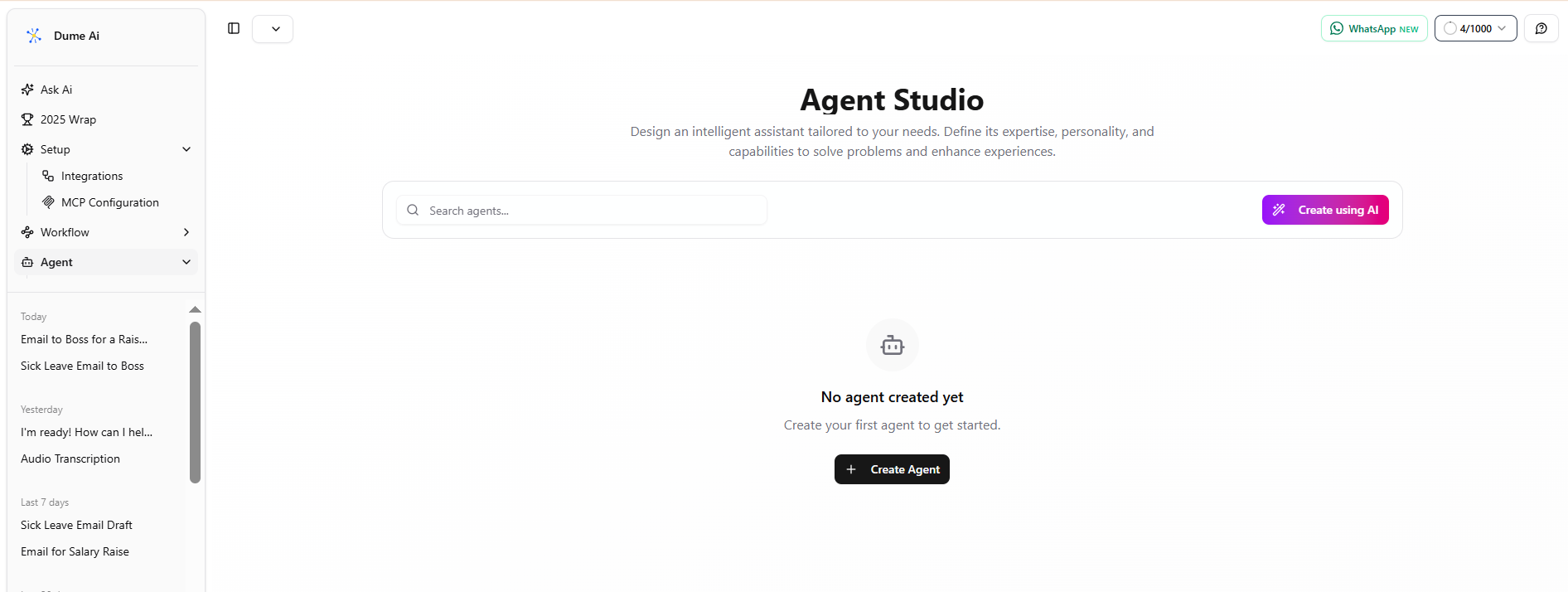
Click "Create using AI." In the prompt box, describe what you want:
"Create a professional email writer that helps employees draft raise request emails. The agent should ask for the employee's manager's email, key accomplishments, role title, how long they've been in the role, and any measurable results. Then it should draft a concise, respectful email and save it to Gmail Drafts."
Dume.ai will generate the agent automatically based on your description.
Option B: Create New Agent (Manual)
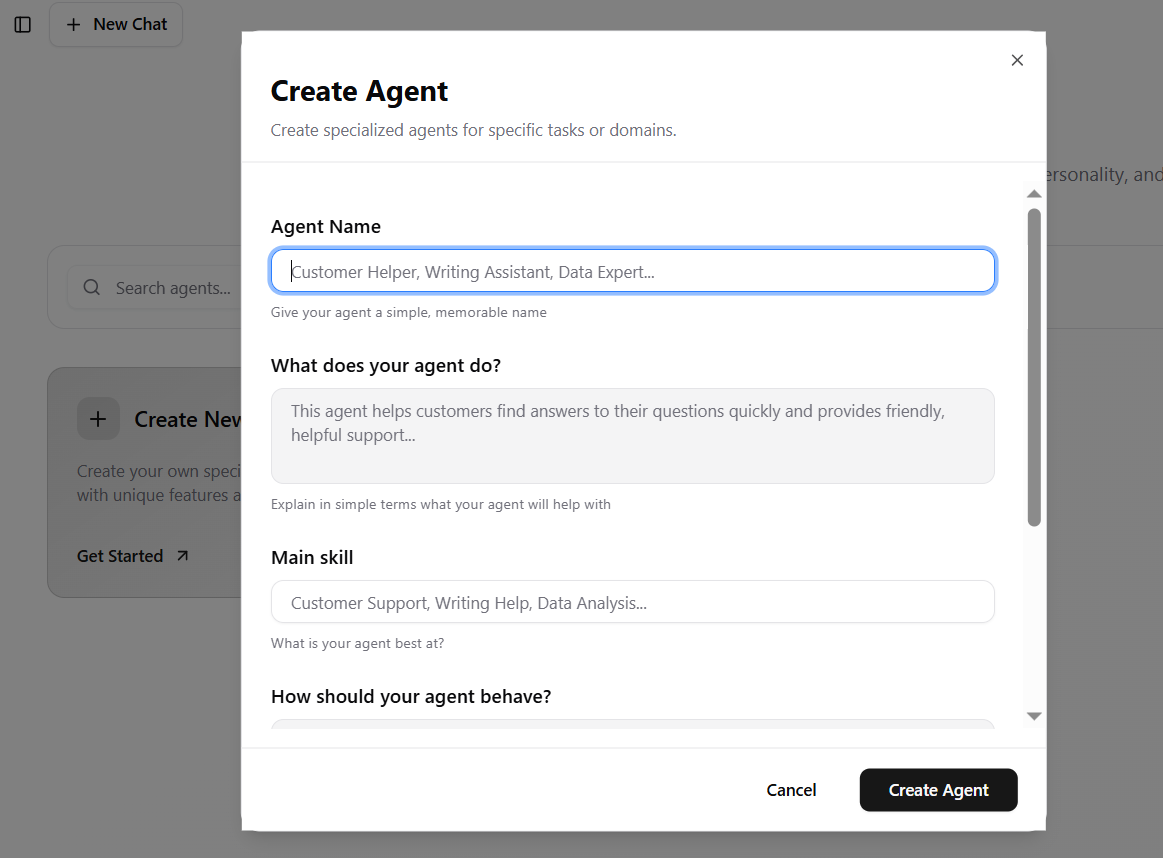
Click "Create New Agent" and fill out the form:
- Agent Name: Professional Email Writer (or Professional Email Assistant)
- What does your agent do?: Writes professional emails for work scenarios, particularly raise requests, performance follow-ups, and salary discussions
- Main Skill: Email Communication and Professional Writing
- How should your agent behave?
- Ask clarifying questions if information is missing (manager name, email, specific accomplishments, role details, dates)
- Write concise, respectful emails that are structured for clarity
- Provide 2-3 tone options (formal, friendly, direct) if the user seems unsure
- Always explain why certain phrasing matters (e.g., "Specific numbers are more persuasive than general claims")
- Save the draft to Gmail automatically so the user can review before sending
Step 3: Connect Gmail Integration
In the agent setup, navigate to "Add tools for your agent to use." Select the Gmail integration (specifically the Gmail Draft tool or Gmail Compose feature). This allows your agent to create and save drafts to your Gmail account.
Make sure you authorize Dume.ai to access your Gmail. You'll be prompted to sign in and grant permission. This is secure and limited to creating drafts the agent cannot send emails without your approval.
Step 4: Save Your Agent
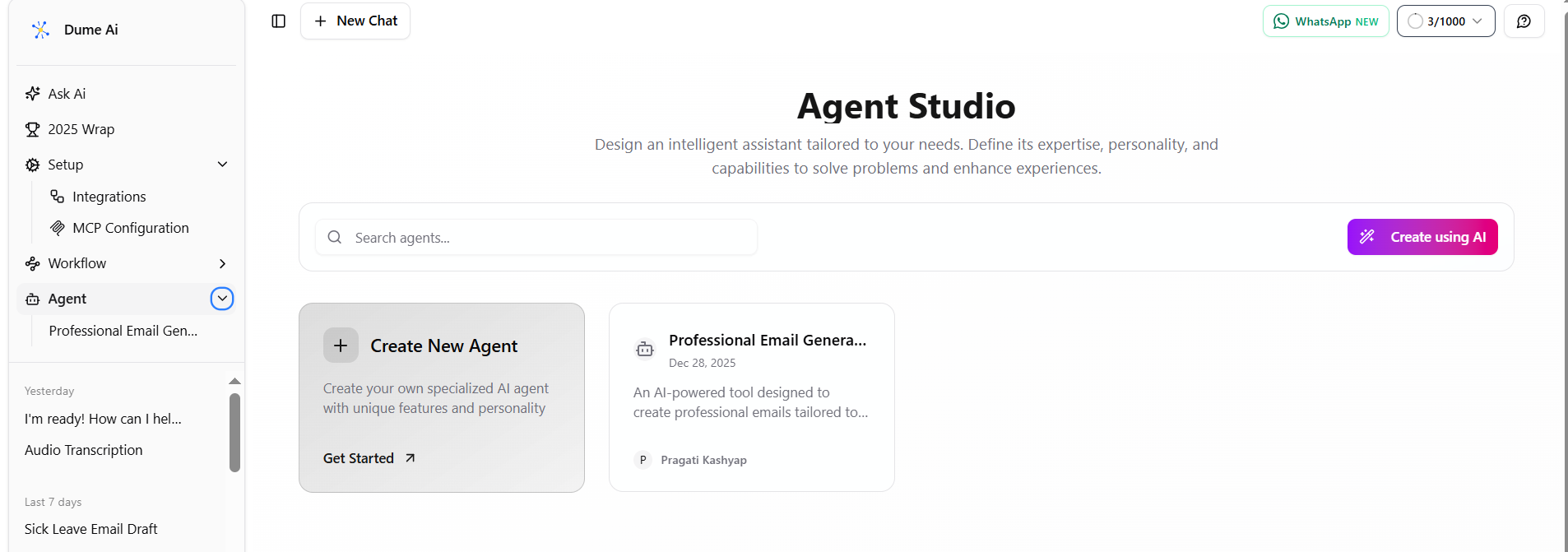
Click "Create Agent" or "Save Agent." You'll see a confirmation: "Agent Created Successfully."
Click "Use Agent" to start using your new Professional Email Writer agent.
Step 5: Ask the Agent to Write and Save Your Email
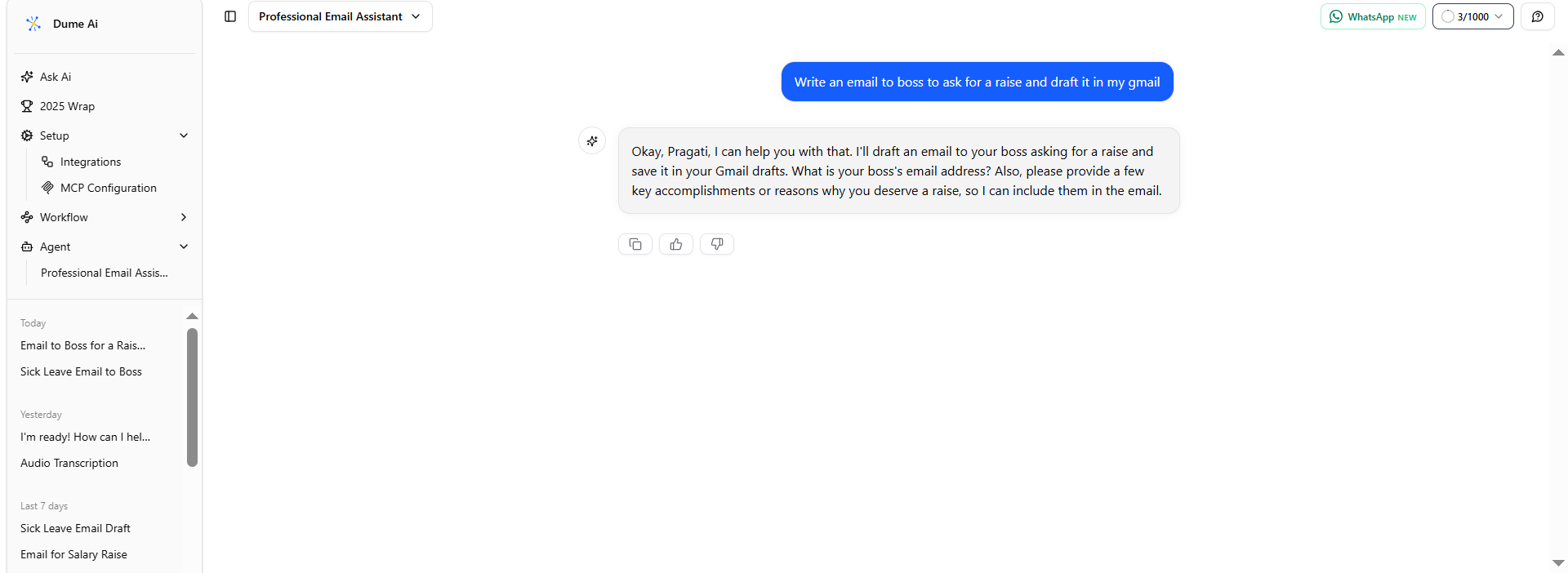
In the agent chat window, type a clear, direct request:
"Write an email to my manager asking for a salary raise and save it to my Gmail drafts."
Or, be more specific:
"Draft a professional raise request email to my manager. I want to reference my recent project delivery and the additional responsibilities I've taken on. Save it to my Gmail drafts."
Step 6: Provide Details When the Agent Asks
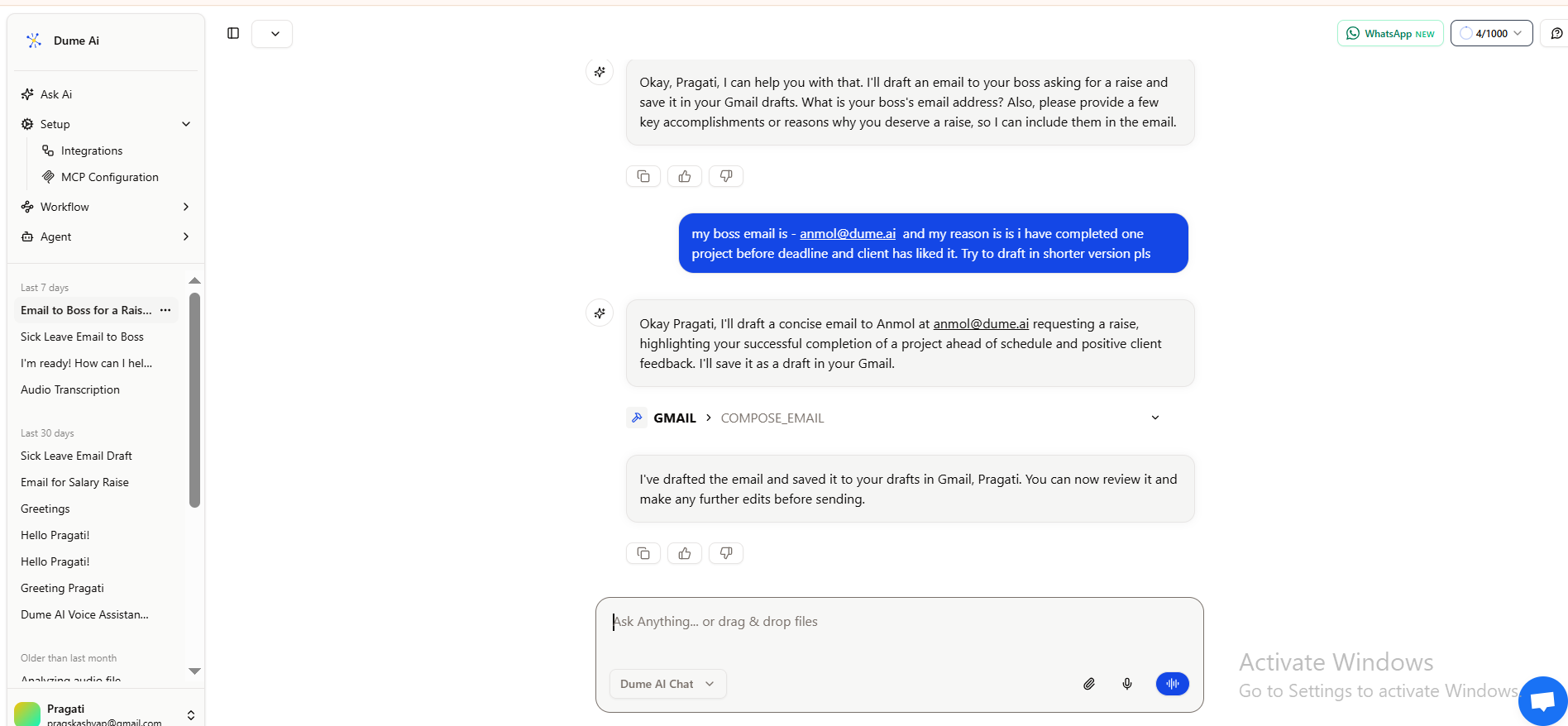
The agent will ask clarifying questions. Here's what to prepare:
- Manager's email address: [your manager's email]
- Your manager's name: [Full name or how they prefer to be addressed]
- Key accomplishments (2-5 bullets):
- Led [Project X], delivered on time and under budget
- Improved [Metric Y] by [X%]
- Took on responsibility for [Process/Team Z]
- Received positive feedback from [Client/Stakeholder]
- How long you've been in your current role: [X months/years]
- Measurable results (optional but helpful):
- Revenue impact: "$X generated" or "Cost savings of $Y"
- Performance metrics: "increased by Z%", "reduced from A to B"
- Client or team impact: "improved satisfaction", "mentored X people"
- Your current salary (optional): Only if you want the agent to estimate an appropriate range
- Preferred tone: Formal, friendly, or balanced
Step 7: Agent Generates and Saves Your Email
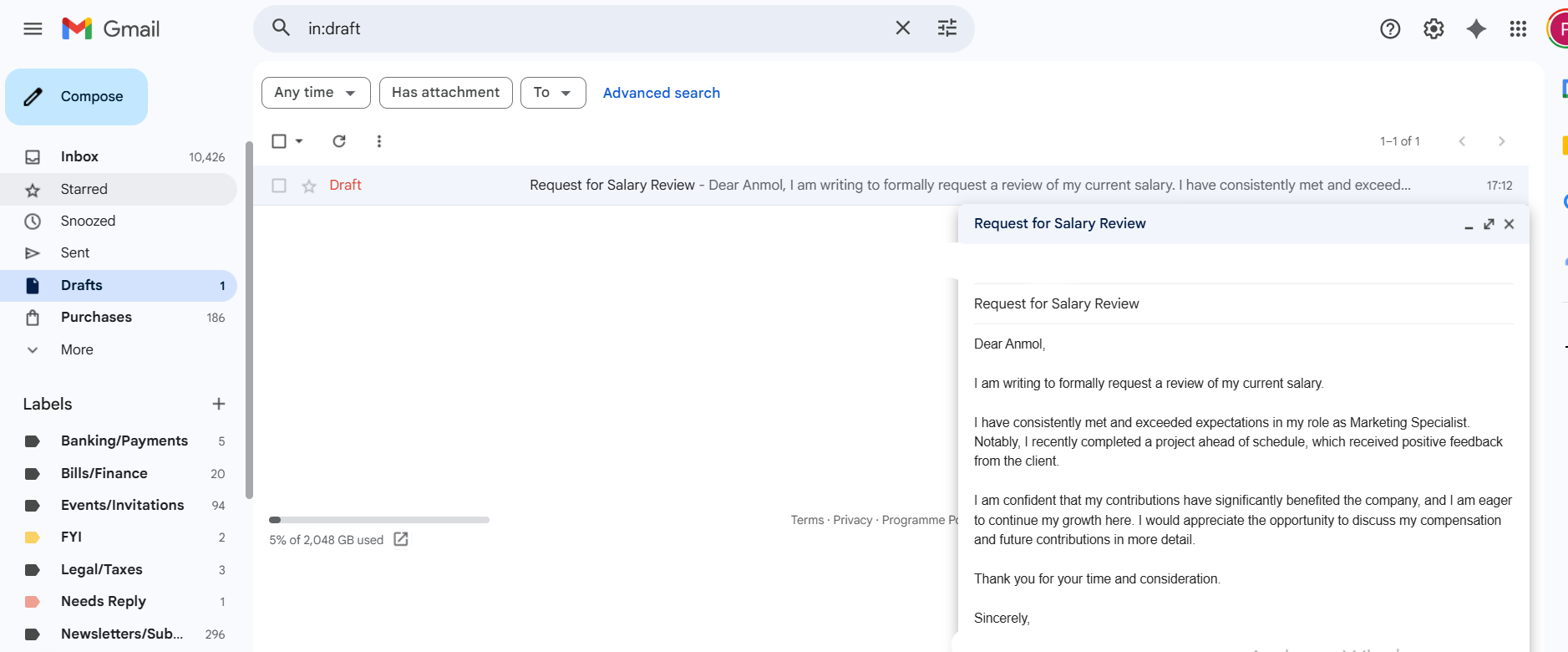
The agent will draft a complete raise request email based on the information you provided. It will include:
- A clear subject line
- Professional greeting
- Context and appreciation
- Specific accomplishments with metrics
- Clear statement of your request (with optional salary range)
- Request for a meeting
- Professional closing
Once drafted, the agent will automatically save it to your Gmail Drafts folder using the Gmail integration.
Step 8: Verify and Edit in Gmail
Open Gmail and navigate to your Drafts folder. You should see your email with a subject line like "Request for Salary Review" or "Discussing My Compensation."
Open the draft and review it for:
- Accuracy of your accomplishments and metrics
- Whether the tone matches your relationship with your manager
- Any personal details you want to adjust
- Spelling and grammar
Make any edits directly in Gmail (remove jargon, adjust the tone, change specific numbers, add or remove details). The email is yours to customize.
When satisfied, you can either:
- Send immediately if you're confident in the content
- Save as draft and send later when the timing feels right
- Generate another version using the agent if you want to try a different tone or emphasis
Key Benefits of Using This Workflow
- Eliminates writer's block: You don't have to face a blank screen. The agent handles structure and tone.
- Ensures professionalism: Your email is checked for emotional language, unclear phrasing, and poor structure before it reaches your manager.
- Saves time: From initial request to Gmail draft typically takes 5-10 minutes, not hours of writing and rewriting.
- Creates a paper trail: Your email is saved in Gmail Drafts, so you have a record of what you asked for and when.
- Reduces anxiety: Knowing your email is professionally written gives you confidence to actually send it.
- Allows multiple versions: If you're unsure, you can ask the agent to create 2-3 variations with different tones, then choose the best fit.
Pro Tips for Using Your Professional Email Writer Agent
- Be specific in your initial request. The more detail you provide about your accomplishments, the stronger your draft will be.
- Ask for tone variations if unsure. If you're not sure whether your manager prefers formal or conversational, ask the agent to generate both options.
- Provide measurable results. Numbers and percentages make your case stronger. "30% improvement" beats "significant improvement."
- Use the agent for follow-ups too. If your manager doesn't respond initially, ask the agent to draft a polite follow-up email.
- Keep a copy. Once you send your raise request email, the agent also has a record. You can reference it later if the conversation continues.
Key Takeaways
- Be clear and direct. State what you want, why you deserve it, and what happens next. Vague requests are easy to ignore.
- Provide specific evidence. General statements like "I work hard" don't move managers. Quantified achievements do.
- Anchor your request in something concrete. The best timing is after a major win, during a performance review, or when your responsibilities have genuinely expanded.
- Avoid emotional language and personal finance justifications. Focus on your professional value, not your feelings or expenses.
- Email works best when you use it strategically. Use email to present your case clearly, then transition to a live conversation where you can discuss and negotiate.
- Anticipate rejection and plan your response. If your manager says no, ask for specific feedback and a timeline to revisit the conversation.
- Structure your email so your manager can forward it. Make it concise and clear enough that it works as a standalone document.
- Respect your manager's process. Don't demand timelines or create ultimatums. Give them space to consider your request and move it through their approval process.
- Document your contributions as you go. Don't wait until raise season to think about your accomplishments. Track wins throughout the year so you have specific examples when you need them.
- Use AI agents to streamline the process. Dume.ai's Professional Email Writer agent removes the friction of drafting, refining, and saving your raise request to Gmail.
Conclusion
Asking for a raise via email works when you prepare thoroughly, write clearly, and focus on your value not your needs. A well-structured email signals professionalism and makes your manager's job easier.
The professionals who succeed aren't the most talented. They're the ones who document accomplishments, research market rates, and communicate with confidence.
Try Dume.ai: Write Your Raise Email in Minutes
Dume.ai's Professional Email Writer agent does the heavy lifting. Answer a few questions about your accomplishments, and it drafts a polished email then saves it to Gmail Drafts.
- Draft in minutes: No blank-page anxiety.
- Multiple versions: Choose formal, warm, or direct tone.
- Saves to Gmail: Review and send on your timeline.
- Removes weak language: Stronger phrasing, better results.
- Works for any career email: Raise requests, follow-ups, thank-yous.
Stop overthinking. Start drafting. Try Dume.ai free today.
How to Create Custom Agents in Dume.ai (Agent Studio Tutorial)
Create Custom Agents in Dume.ai (Agent Studio Tutorial)
FAQs
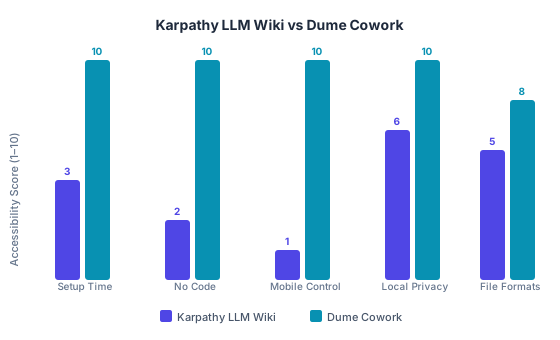
Karpathy's LLM wiki builds a compounding AI knowledge base from raw files. Here's the no-code version for non-technical users — Dume Cowork, free in 5 min.

A desktop AI agent runs locally on your Mac or PC, completing file work and research end-to-end. Learn what they are, how they work, and how to choose one.